Run dynamic queries with sp_executesql and access call more Dataverse messages as stored procedures or functions with this latest update.
sp_executesql support
The biggest new feature in this release is support for the sp_executesql stored procedure. This lets you build up a string of a command you want to run and then execute it dynamically.
⚠️ Warning: If you are using this stored procedure, please be aware of the possibilities of SQL injection attacks! This is a powerful function to unblock certain scenarios, but with great power comes great responsibility! Note that sp_executesql does allow you to pass parameter values to your query as well, which should be used where possible.
For example, say you want to get the number of records in each table. You can get a list of tables using SELECT logicalname FROM metadata.entity, you can even access this in a loop using a cursor, but you can’t use a variable for a table name like SELECT COUNT(*) FROM @table. The solution is to build up the query as a string and then execute it using sp_executesql:
CREATE TABLE #counts (logicalname VARCHAR(100) NOT NULL, records INT, errormessage NVARCHAR(max))

DECLARE @sql AS NVARCHAR (MAX) = '';

DECLARE @table AS VARCHAR (100);

DECLARE c CURSOR
    FOR SELECT logicalname
        FROM   metadata.entity;

OPEN c;

FETCH NEXT FROM c INTO @table;

WHILE @@fetch_status = 0
    BEGIN
        SET @sql += ';
            BEGIN TRY
                INSERT INTO #counts SELECT ''' + @table + ''', COUNT(*), NULL FROM ' + @table + ' OPTION (USE HINT (''RETRIEVE_TOTAL_RECORD_COUNT''))
            END TRY
            BEGIN CATCH
                INSERT INTO #counts VALUES (''' + @table + ''', NULL, ERROR_MESSAGE())
            END CATCH';
        FETCH NEXT FROM c INTO @table;
    END

CLOSE c;

DEALLOCATE c;

EXECUTE sp_executesql @sql;

SELECT * FROM #counts;

DROP TABLE #counts
This creates a single query that adds a record into a temporary table showing the number of records in a table, or an error message if the record count can’t be retrieved for any reason. It then executes this query and shows the results.
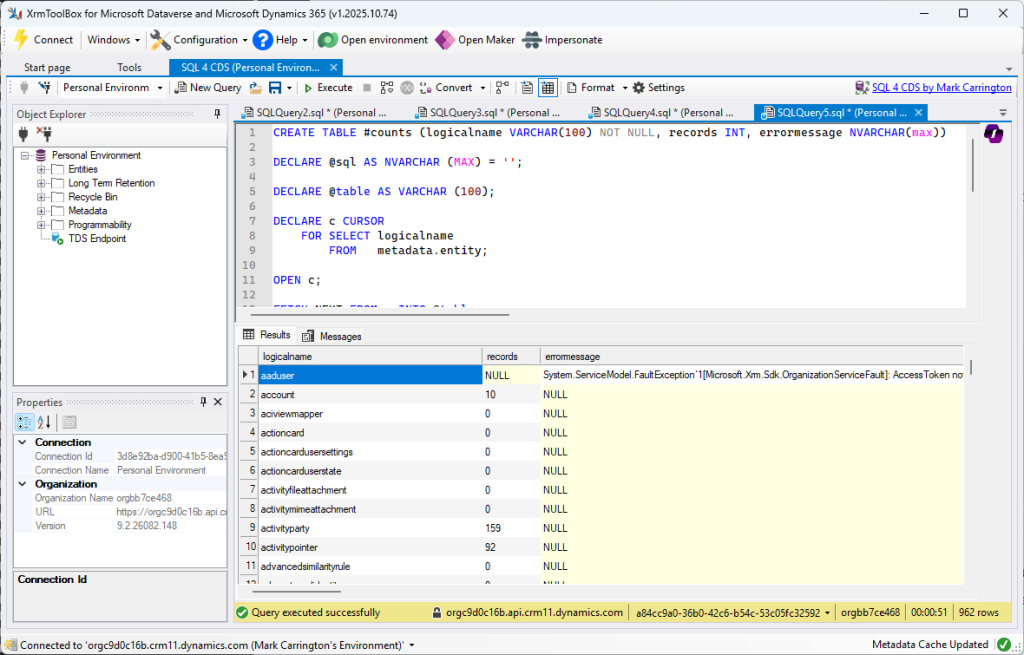
If you want to run this query yourself, note the use of the RETRIEVE_TOTAL_RECORD_COUNT query hint. This speeds things up by getting a cached record count where possible, but this can be inaccurate. If you want to get definite results, remove the whole OPTION clause.
Extended message support
SQL 4 CDS has been able to execute Dataverse messages using stored procedure and table valued function syntax since version 7. This update expands the range of messages that are supported by lifting the restriction on the type of output values that are supported.
If a message returns results with values that aren’t just simple scalar values or a single entity or entity collection of a known type, whatever values are returned are serialized as JSON and returned in a Value column:
DECLARE @objectId AS UNIQUEIDENTIFIER;

DECLARE @componentType AS INT;

SELECT @objectId = metadataid,
       @componentType = objecttypecode
FROM   metadata.entity
WHERE  logicalname = 'account';

SELECT *
FROM   RetrieveDependenciesForDeleteWithMetadata(@componentType, @objectId);
This returns a Value column with a single row:
{
  "DependencyMetadataCollection": {
    "DependencyMetadataInfoCollection": [
      {
        "requiredcomponentobjectid": "a1965545-44bc-4b7b-b1ae-93074d0e3f2a",
        "requiredcomponentdisplayname": "Account Name",
        "requiredcomponenttype": 2,
        "requiredcomponentname": "name",
        "requiredcomponenttypename": "Field",
        "requiredcomponentbasesolutionid": "fd140aad-4df4-11dd-bd17-0019b9312238",
        "requiredcomponentbasesolutionname": "System Solution",
        "requiredcomponentbasesolutionuniquename": "System",
        "requiredcomponentbasesolutionversion": "5.0",
        "requiredcomponentparentid": "70816501-edb9-4740-a16c-6a5efbc05d84",
        "requiredcomponentparentdisplayname": "Account",
        "dependentcomponentobjectid": "e9c5760b-12b2-4bbe-9911-8f1d2b832920",
        "dependentcomponentdisplayname": "Send follow up email",
        "dependentcomponenttype": 10581,
        "dependentcomponentname": "Send follow up email",
        "dependentcomponenttypename": "FxExpression",
        "dependentcomponentbasesolutionid": "ff6083c7-eaf3-4fea-82d7-761cb64f0704",
        "dependentcomponentbasesolutionname": "Dataverse Accelerator App",
        "dependentcomponentbasesolutionuniquename": "msdyn_DataverseAcceleratorApp",
        "dependentcomponentbasesolutionversion": "1.0.4.36",
        "dependentcomponentparentid": "00000000-0000-0000-0000-000000000000",
        "dependencyid": "ea287f89-9f26-43c7-adc0-7baded7d8e52",
        "dependencytype": 2,
        "dependencytypename": "Published",
        "isdependencyremovalenabled": true,
        "dependentcomponententitysetname": "fxexpressions",
        "dependentcomponententitylogicalname": "fxexpression",
        "requiredcomponententitylogicalname": "attribute"
      },
      ...
    ]
  }
}
If you want to get more details out of this as part of your query, you can use various JSON functions such as JSON_VALUE, JSON_QUERY and OPENJSON.
Other minor fixes
Some other improvements and fixes in this release:
RetrieveTotalRecordCount
This optimization for quickly getting an approximate count of records in a table was previously returning a bigint value, while the COUNT(*) query it comes from should return an int value, which is now fixed.
There are also some tables that this message doesn’t work for, and would previously return an error Entity xxx is not valid for read. This update now handles this and falls back on other, slower methods of getting the record count instead.
Better TRY/CATCH support
If an error occurs during a SQL script, execution would previously move to the first CATCH block, even if the error did not occur within a TRY block. This is now improved to go only to the CATCH block that is associated with the statement the error occurred on.
Metadata queries
The queries generated for retrieving metadata now avoid properties which are defined in the client SDK but aren’t actually accessible from the server, and produce more readable queries if you are using the execution plan to build your own .NET code to retrieve the metadata based on that query.
Column autosizing
Because rows are shown in the grid as they are available, rather than waiting for all the results to be loaded, column autosizing is now more difficult. In cases where it took a while for the first rows to be returned, this could result in the columns not being resized at all. This now waits for at least some rows to be populated before resizing the columns, although there may still be cases where the columns are too narrow to fully display results from later rows.