This latest update includes various improvements to the AI features in the editor and a new benefit for GitHub sponsors!
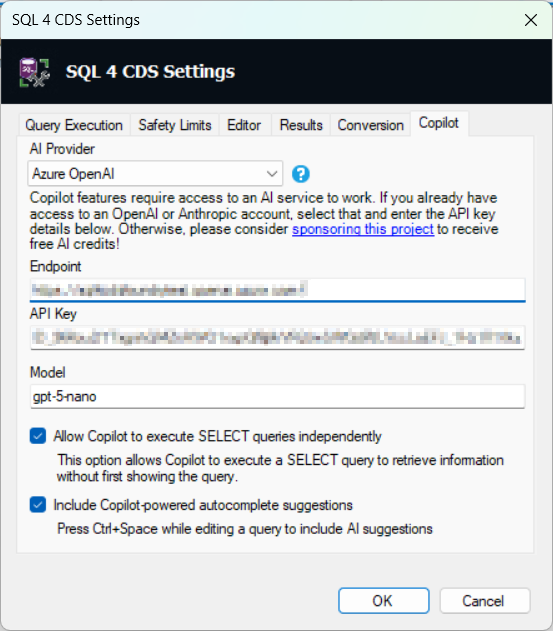
Copilot Settings
The Copilot feature has had an overhaul in this version. Taking inspiration from the great work Jonas and Andreas have been doing with similar features in FetchXML Builder, this now works with more services including Anthropic. The restructuring will also make it easier for me to enrich it with more specialised tools in future.
The Copilot setting screen is now simplified, so you now need to enter:
- The AI provider you want to use. You can use Open AI, Azure Open AI or Anthropic, or a new Sponsorship option (more on this later)
- The endpoint of your deployment if you’re using Azure Open AI
- The API key for your chosen provider
- The name of the model to use
More feedback from Copilot
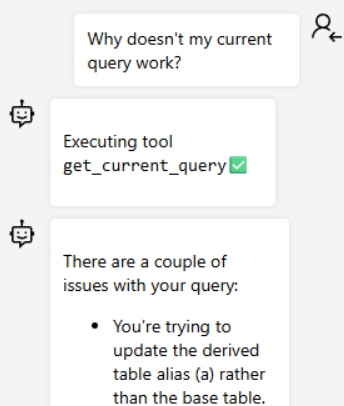
Copilot will also show when it’s executing a tool that’s interacting with your query or data so you always know what’s going on:
AI-powered autocomplete suggestions
At the bottom of the settings screen, you might have noticed a new option:
“Include Copilot-powered autocomplete suggestions”
When this option is checked, as well as using the chat pane you can also press Ctrl+Space to open the autocomplete popup and get some more suggestions:
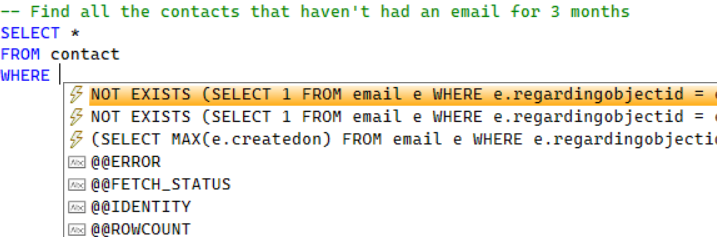
The AI-generated suggestions are shown at the top with the ⚡icon. They don’t appear with the as-you-type suggestions as they can take a few seconds to generate, but will show up if you manually open the popup with Ctrl+Space.
Adding comments to describe what your query should do can be very helpful in guiding the AI to create helpful suggestions!
AI credits for sponsors!
In the Copilot settings page, one of the new options for the AI provider is “Sponsorship”.
As a thank-you to anyone who sponsors the project on GitHub, I’m giving free credits for you to use to unlock the AI features without you needing a separate Anthropic/Open AI/Azure Open AI account. You can sponsor as an individual or as an organization – get your company to sponsor and everyone in your organization can benefit!
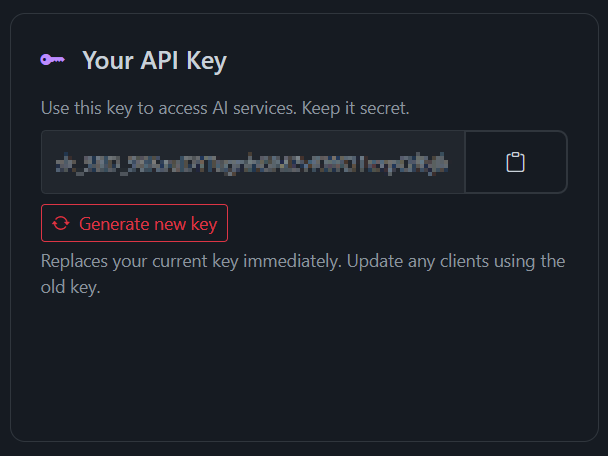
Log in to ai.markcarrington.dev with your GitHub account to see what credits you can get. Sponsorship tiers start from $5/month for individuals or $100/month for organizations. Once you’ve started sponsoring the project, go to the Copilot settings page, select the Sponsorship provider and put in your API key that you get after logging in to ai.markcarrington.dev. Enter either gpt-5-nano or gpt-5 as the model name and you’re good to go!
Wait, do I have to pay for SQL 4 CDS now?!
Not at all, you can carry on using it exactly as before, either without the AI features or by using some other external AI service. I’m just trying adding this as an extra benefit for anyone that does want to sponsor the project to help make it more sustainable.
I’d love to see some of the organizations that are seeing a benefit from their employees using this tool to save them time sponsoring it and giving them an extra benefit of free AI credits into the bargain!
I am trying to use AI suggestions via Anthropic.
I cannot find the correct string to indicate the model I am using, can anyone help?