Easily import data from CSV files into Dataverse, see the results of your queries while they are still running and support for lots of additional maths functions are in this latest update.
Importing data from CSV
If you’ve exported data from another system into a CSV file, you can now easily import it into your Dataverse environment with SQL 4 CDS using the OPENROWSET (BULK) syntax.
INSERT INTO account (name, telephone1)
SELECT Name, Phone
FROM OPENROWSET(BULK 'C:\Users\MarkC\Documents\Data.csv', FORMAT='CSV', FIRSTROW=2)
WITH (
    Name nvarchar(max),
    Phone nvarchar(max)
) AS input
There’s a few key options to control how the data is loaded from your file:
FIRSTROWindicates which line in your file is the first data row. If your file has a header line you’ll want to skip it by specifyingFIRSTROW=2ROWTERMINATOR,FIELDTERMINATOR,FIELDQUOTEandESCAPECHAR. These file format options control how the file is parsed. If you’ve got a tab delimited file instead of a CSV for example, you can specifyFIELDTERMINATOR='\t'CODEPAGEdefines the character set your file is saved in. UseCODEPAGE='65001'for UTF-8 files,CODEPAGE='1252'for the Latin1 character set. If you find some special characters aren’t being loaded correctly, it’s probably because of this setting.
You can also load data from multiple files at once using a wildcard:
INSERT INTO account (name, telephone1, new_sourcefile)
SELECT Name, Phone, input.filename()
FROM OPENROWSET(BULK 'C:\Users\MarkC\Documents\Data*.csv', FORMAT='CSV', FIRSTROW=2)
WITH (
    Name nvarchar(max),
    Phone nvarchar(max)
) AS input
You can use the filename() and filepath() metadata functions to get information about where the data for each individual row came from.
You don’t have to use the OPENROWSET (BULK) command only with an INSERT statement – you can combine it with other data to enrich existing records with an UPDATE, find records which aren’t in your CSV file and DELETE them – let me know how you find it useful!
Remember you can also right-click on the results grid after running a query and select “Save as CSV…” to create a file that you can use with this syntax in another query.
Get results while your query is still executing
When you run a SELECT statement, you’ll now start to see the results grid fill with data while the query is running rather than having to wait for it to finish.
If your queries take a while to run, hopefully this will let you start making use of the first results quicker, or identify if there is a problem with your query and stop it without wasting too much time.
Results as text
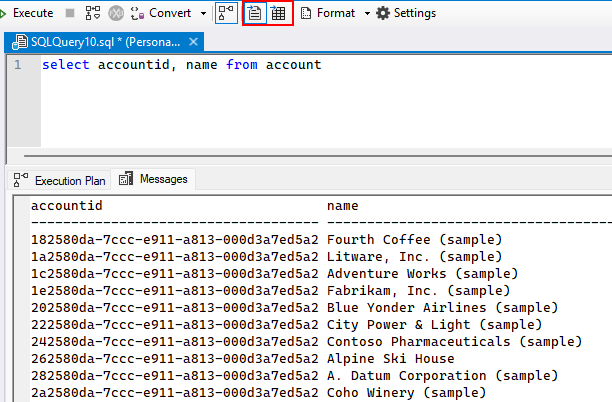
Similar to SSMS, SQL 4 CDS now supports displaying your query results as text as an alternative to the grid view. Just choose which output format you prefer in the toolbar:
New math functions
Thanks to @sulimanbenhalim for contributing implementations for several math-related functions:
Please let me know if there are any other functions that would be helpful to include!
StateCode and StatusCode optionset metadata
The metadata.optionsetvalue table now contains additional columns to describe the options in statecode and statuscode columns.
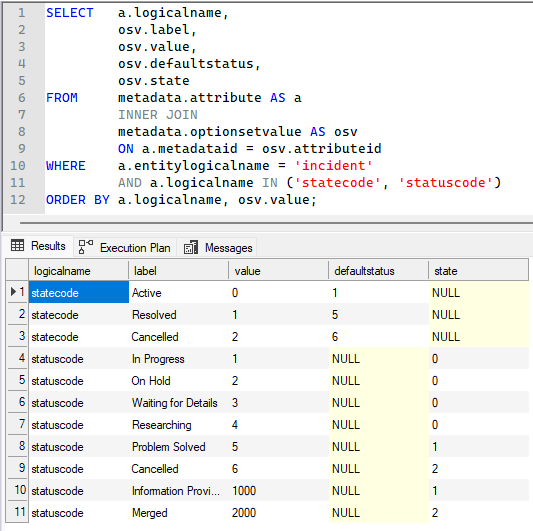
The defaultstatus column will be populated for statecode values, while the state column will be populated for statuscode values to indicate its corresponding statecode. invariantname is also available for statecode, and transitiondata describes any custom state transitions that are defined for statuscode values.
When you try to copy query results or output them to csv or excel file, the tool crashes. When you switch to Results to Text, it works. Something is wrong with rendering grid data.
This sounds like the bug reported at https://github.com/MarkMpn/Sql4Cds/issues/781, please check that for updates.
I’m getting this error “object reference not set to an instance of an object” when trying to download my query results.
I’m not sure what you mean by downloading the results, can you please create an issue at https://github.com/MarkMpn/Sql4Cds/issues with the full details?