Welcome to the final update to SQL 4 CDS for 2025!
importsequencenumber column updating
You can now update the importsequencenumber column that is available in most standard tables. This is normally used for when you import data using the standard tools such as import from Excel to track the row number that each record was imported from.
⚠️ Warning! This may stop working in future updates to Dataverse! Read on for more technical details…
This column is marked as not updateable in the metadata, and a standard Update message using the Dataverse SDK will not modify it (interestingly the request will not fail, but the change to this attribute will be silently ignored).
Thankfully Jonas had already figured this out for the Bulk Data Updater tool and found that the UpdateMultiple message does allow this to be modified. However, this has to be treated as undocumented behaviour or even a bug in Dataverse that may be fixed at any time, at which point changes to this field will again stop working.
In the meantime however, you might find it useful to use this field to tag records with a unique value that has some other meaning to you, or to rank them in sequence:
UPDATE c
SET    importsequencenumber = rnum
FROM   (SELECT *,
               row_number() OVER (ORDER BY createdon) AS rnum
        FROM   contact) AS c;
Results Grid Sizing
As well as changing the font for the SQL editor, you can now control the font size used for the results grid to make it easier to read.
In the Settings dialog, go to the new “Results” tab to change the size:
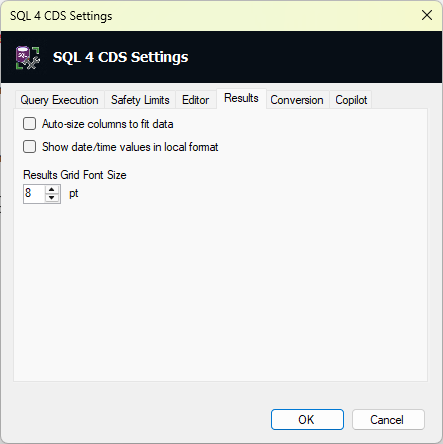
The standard Windows system font will still be used, but using this setting you can make it larger if necessary:

TDS Endpoint Fixes & Improvements
When using the TDS Endpoint to run queries, SQL 4 CDS could leave connections open until it eventually runs out of resources after running 100 queries. This is now fixes so you can reliably run many queries that use the TDS Endpoint.
If you use the SQL 4 CDS engine in your own application via the ADO.NET provider, you may encounter issues where it would not use the TDS Endpoint due to an authentication token not being available if you use the ExternalTokenManagement authentication process. To allow your application to provide a token that allows access to the TDS Endpoint in these cases, the DataSource class now exposes a public Func<string> AccessTokenProvider { get; set; } property which allows you to pass your token provider to SQL 4 CDS as well as the underlying ServiceClient. Many thanks to Rob Wood for this enhancement!
Loading issues on Turkish locales
This release should also resolve an issue when loading the XrmToolBox plugin on PCs using Turkish language settings.
Unsure if you have made any changes to support the latest SSMS version (22.1.0) – https://learn.microsoft.com/en-us/ssms/release-notes-22
Can you confirm which version(s) of SSMS this latest version works with?